My friend bibchik has developed the amazing data mining website https://11tt.top/ .
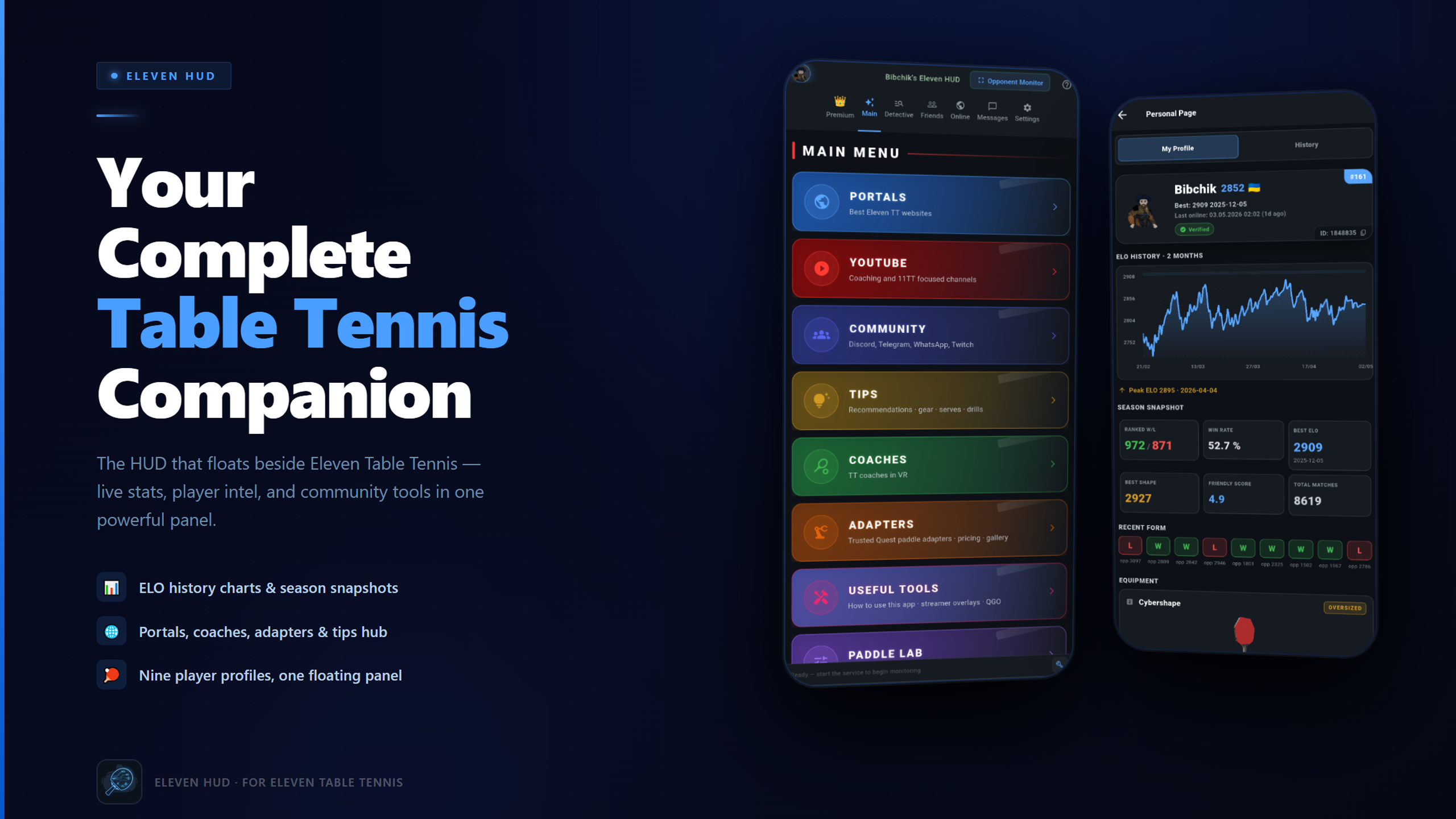
He also made a unique app called Eleven HUD that helps the players in various ways. Nobody describes it better than the creator:
I’ve been playing 11TT for a while and built something I always dreamed about but never found — a VR companion panel that floats beside the game. No headset off, no extra clicks.
Who it’s for:
📌 New to the game or VR? Real-player gear picks, paddle calibration, Ball Machine presets, and a curated starter guide — you won’t have to figure it out alone. 📊 Climbing the ladder? Best ELO, peak shape, recent results, win probability — even before accepting a match. Open Detective the night before a tournament and show up prepared. 💬 Social or casual? See who’s online, message friends, jump into group chats. Built-in community directory + 11Clubhouse friendly score at a glance. 🎯 Want good matches, not just ranks? Filter the global online list by ELO — a worthy opponent is two clicks away. 📚 Willing to improve? Curated coaching contacts, YouTube channels, and lesson series the community actually trusts.
Open Eleven HUD next to your game — and never play blind again.
Would love to hear what you think. I really hope you enjoy it as much as I do.
A huge thanks to every player who tested, gave feedback, and kept me going through the whole journey — and of course to carrotstein. You know who you are. 🙏
Premium unlocks extended analytics, Paddle Intelligence, AI Spy Analysis, Ball Machine Presets, faster opponent detection, and the full ELO-filtered online list.
Want to try Premium before committing? DM me — active community members might already spot a little surprise in their Premium tab 🙂
Have you ever wondered what rubber settings the top players in Eleven Table Tennis use?
Discord user Korg put together an interesting analysis of the rubber settings used by the top 100 players on the 11 Clubhouse global leaderboard. That’s 200 rubber sides to look at, and there are some interesting patterns in the data.
I thought it was worth sharing a few of the findings here.
51 out of the top 100 players use an oversized paddle.
Players using oversized paddles also tend to use slightly lower bounce settings than those using standard-size paddles.
Does that mean oversized paddles are better? Not necessarily, but it’s interesting to see how common they are among highly rated players.
Defensive rubber is more common than you might think
26 players use a bounce setting below 0.60 on at least one side of their paddle.
Many of them use different setups on each side, combining slower rubber on one side with a more conventional setup on the other.
So if you’re experimenting with your own paddle, there’s no reason to assume both sides need to be identical. Different setups can serve different purposes.
Maximum friction is a popular choice
58 of the 100 players use maximum friction on at least one side.
On the other hand, 42 players use less than maximum friction on both sides. Clearly, maximum friction is popular, but it’s not a requirement for playing at a high level.
Bounce and throw tend to go together
One of the more interesting findings is that higher bounce settings tend to be associated with higher throw settings.
The relationship isn’t perfect, of course, but it’s worth keeping in mind when adjusting your own rubber. Changing one setting can affect how the overall setup feels, so it makes sense to experiment with bounce and throw together.
Is there a magic rubber setup for climbing the leaderboard?
Apparently, not an obvious one.
Korg’s analysis found little relationship between most rubber settings and Elo rating. Throw showed a weak negative correlation, meaning higher-rated players tended to use slightly lower throw settings on average.
That doesn’t mean the setting makes them better players. It simply shows that, among these top 100 players, there isn’t an obvious combination of rubber settings that separates the best from the rest.
And that’s probably the most interesting takeaway: there’s no single setup that everyone at the top uses.
Explore the data yourself
These are just a few highlights from Korg’s analysis. The full report lets you dig into the settings, compare the two sides of a paddle, and look for patterns across the leaderboard.
If you’re trying to find a setup that suits your own playing style, it could be a useful source of ideas.
Just remember that a setup that works for a top player won’t necessarily work for you. Use the data as a starting point for experimentation, not as a recipe you have to follow.
Big thanks to Korg for putting this together and sharing it with the community!
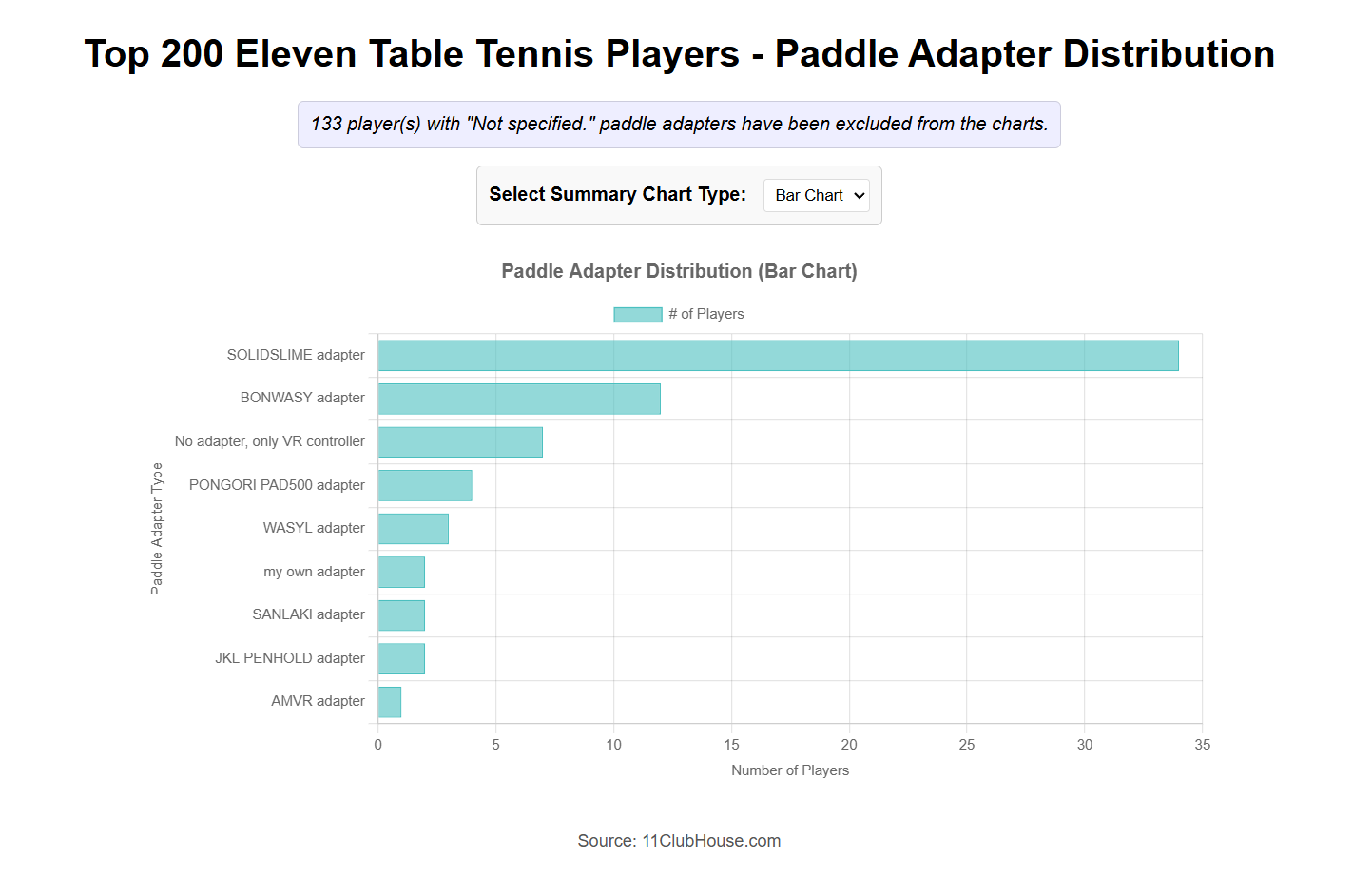
Also, if you’re curious about which adapters top Eleven Table Tennis players use, here’s another graph based on data from 11clubhouse.
Among the players who use an adapter, most seem to be using SolidSlime. It’s really nice to see, and honestly, it means a lot to me. I’ve put a lot of time and care into these adapters, so knowing that players are finding them useful is both encouraging and motivating. A big thank-you to everyone who has chosen to use one and supported the project along the way!
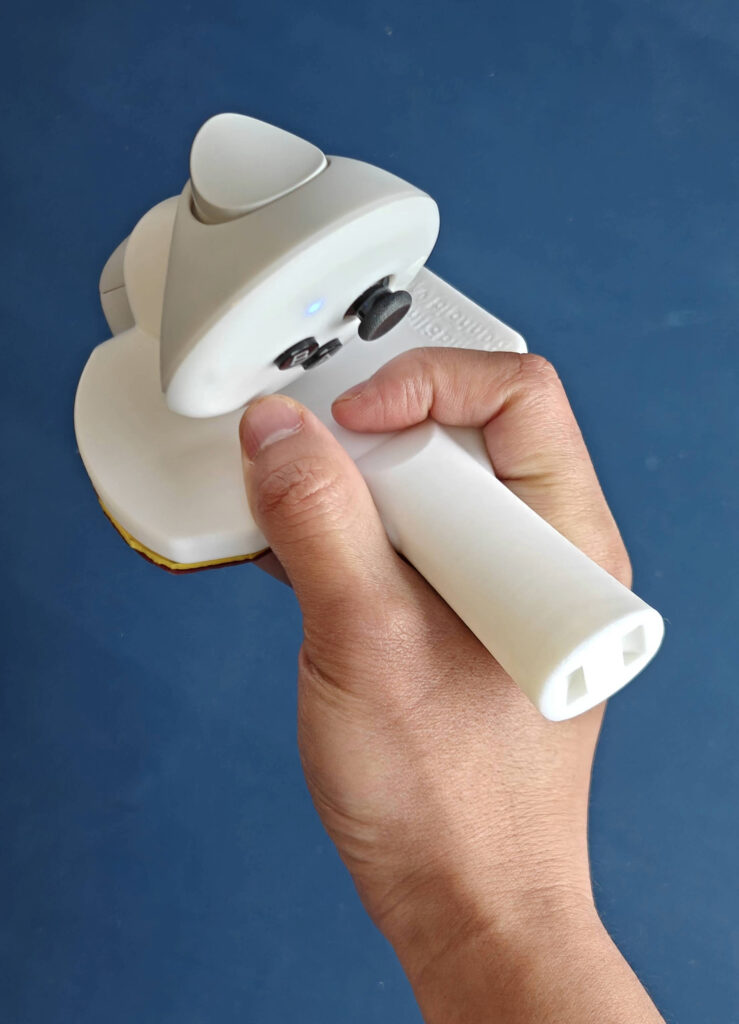
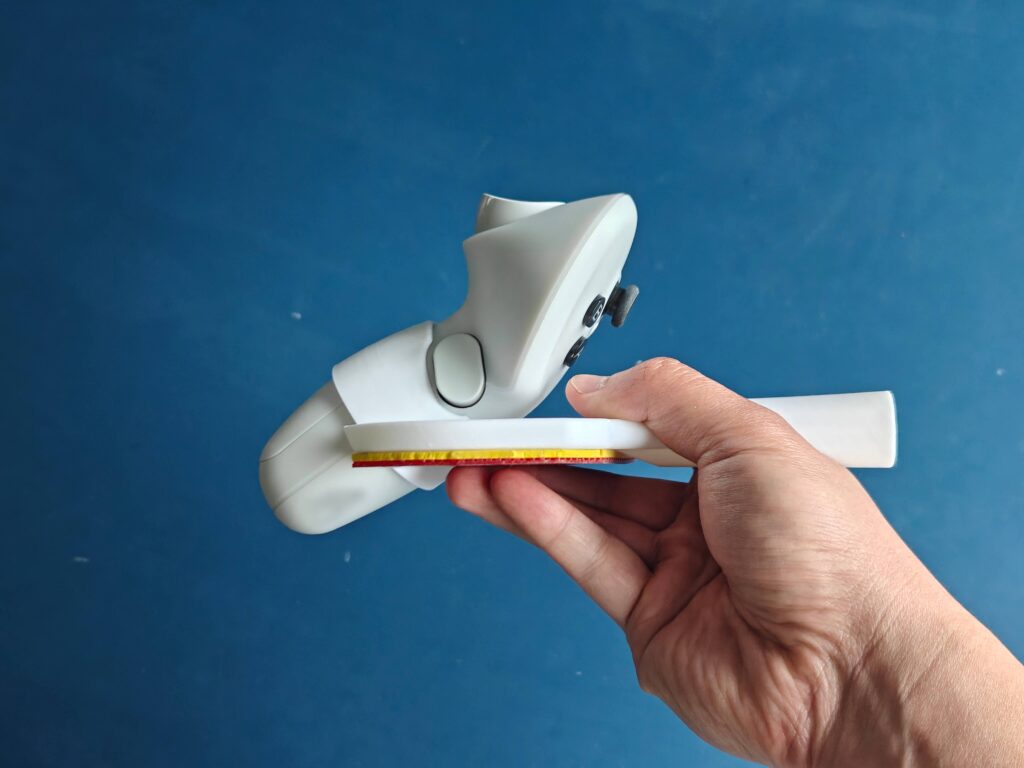
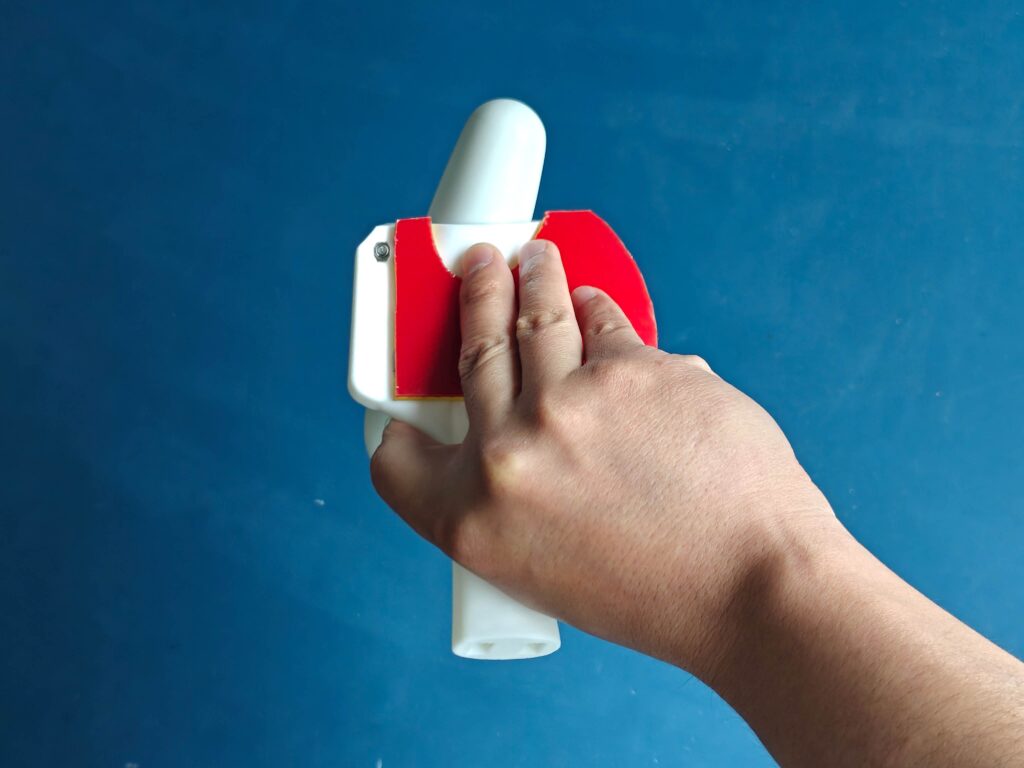
After several weeks of designing, prototyping, and testing, we’re excited to announce that the SolidSlime Steam Frame adapters are now ready to order! It’s a fantastic tool to play VR table tennis games (such as Eleven Table Tennis) on Steam Frame.
Thanks to the suggestions from the players who expressed interest, we’ve developed two main versions of the adapter: one for shakehand and one for penhold.
(Please click the links above to see the full feature list of each adapter)
During testing, we discovered that the Steam Frame controller offers excellent tracking LED coverage. In practice, this means the controller can maintain tracking across a wide range of rotation angles, which is particularly useful for table tennis players who like to twiddle their racket.
To take full advantage of this, we’ve also developed a full-width shakehand variant. It gives players who frequently flip their racket more freedom to rotate it while making the most of the controller’s tracking capabilities.
Full width adapter
As usual, you can choose from flared, straight, and anatomic handles, along with Chinese and Japanese penhold handles. Right-handed and left-handed versions are available, too.
Why we chose tracking over ergonomic strap compatibility
There’s one requested feature we unfortunately couldn’t include: compatibility with the Steam Frame ergonomic strap.
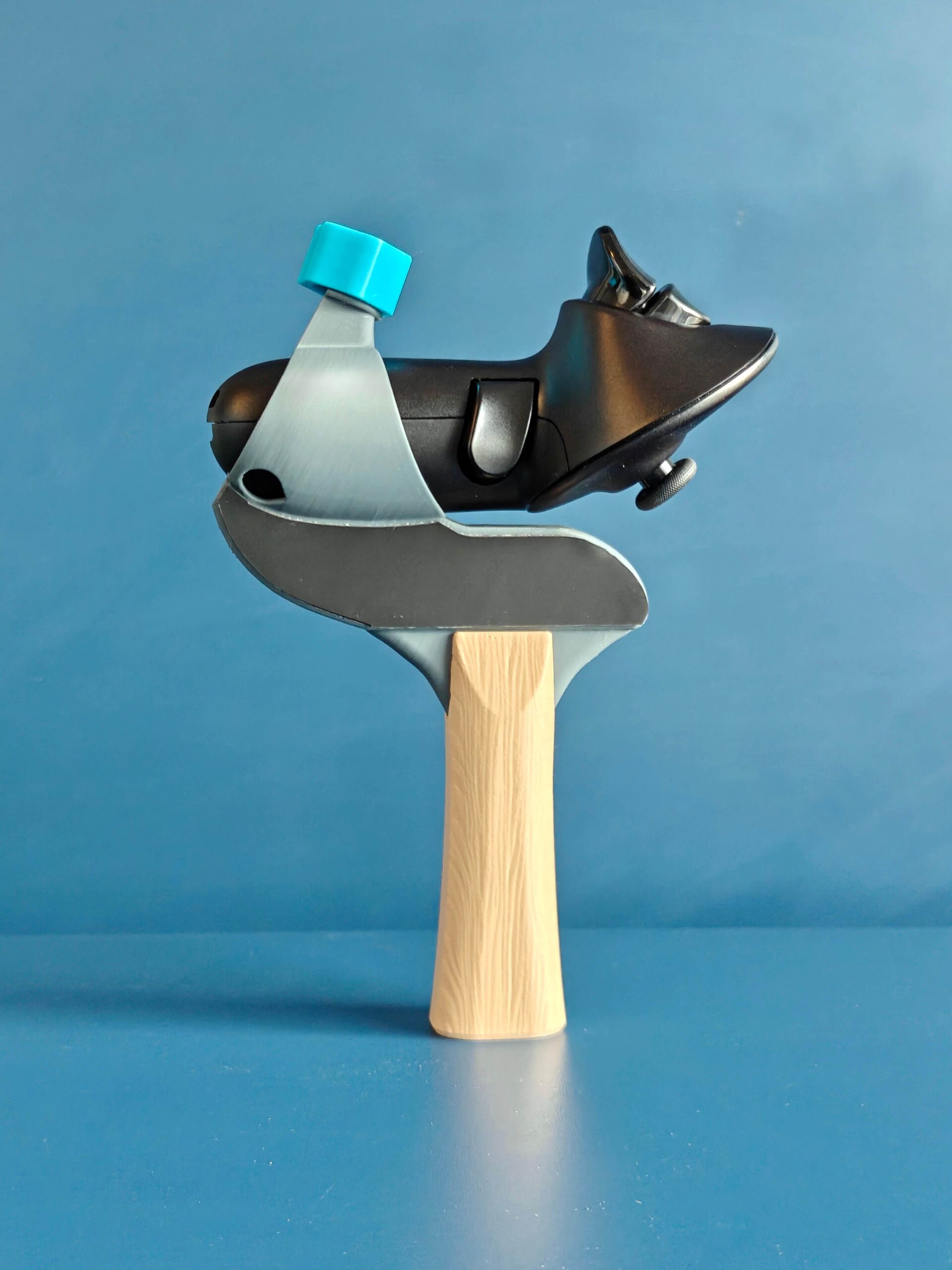
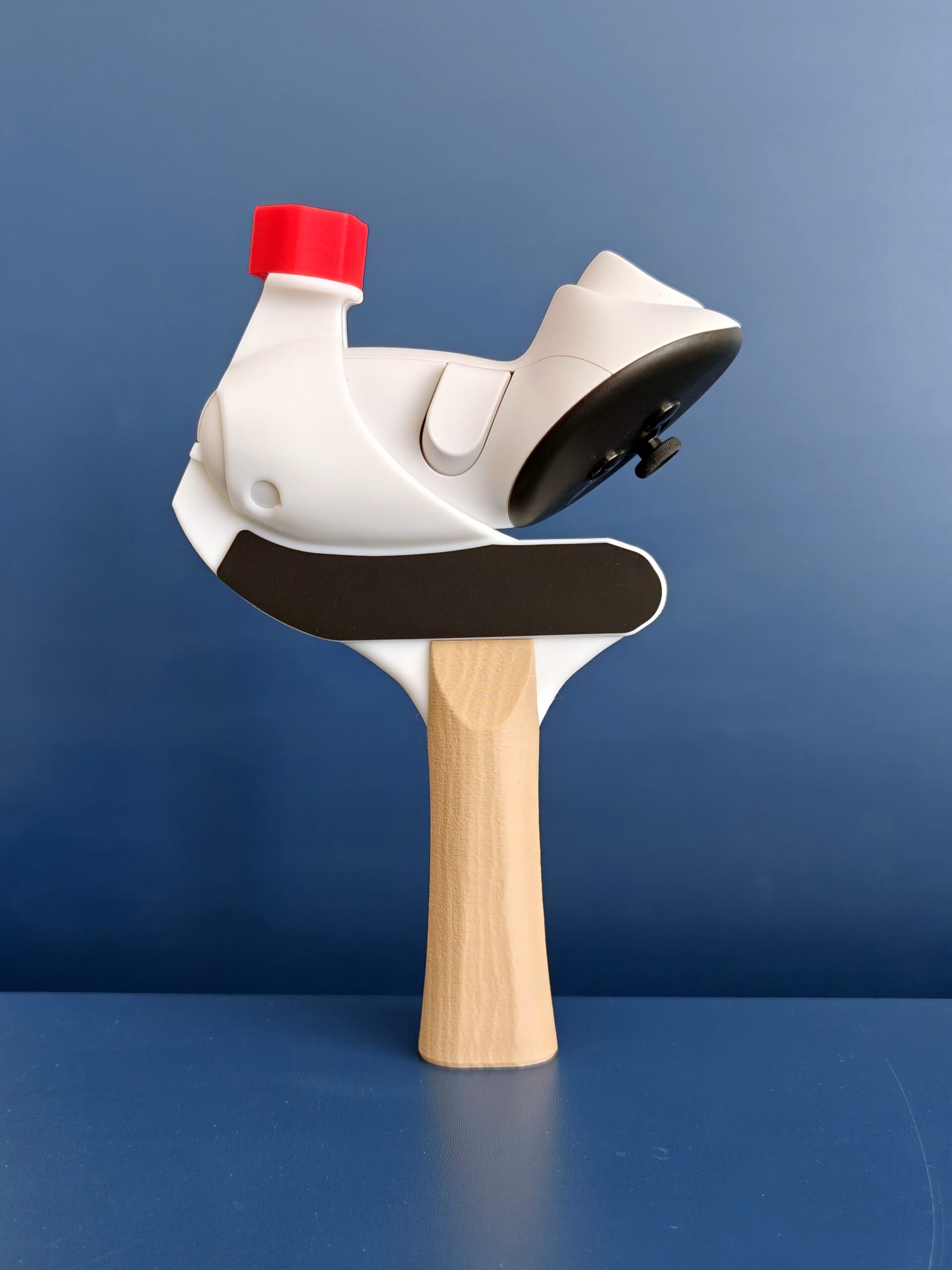
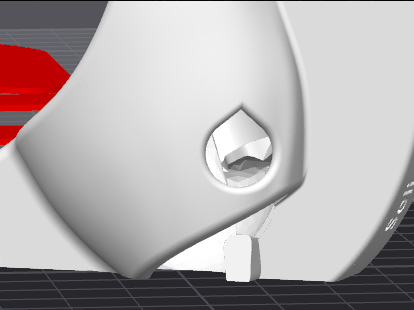
Our initial prototype, shown below, actually supported the ergonomic knuckle strap. However, after extensive testing, we found that this controller orientation delivered around 30% worse tracking performance than our final design, which positions the controller horizontally.
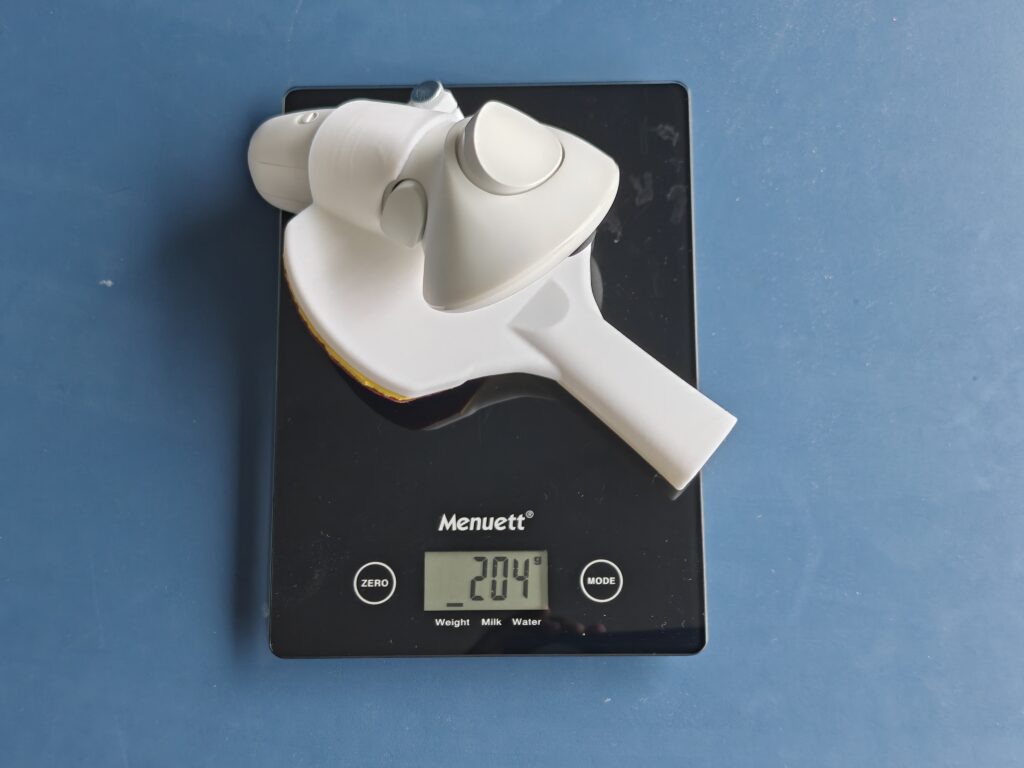
For us, tracking performance has to come first. We’d rather deliver an adapter that tracks reliably during fast rallies than compromise performance to accommodate an additional accessory. The ergonomic strap itself also weighs around 20 grams, adding considerable weight to the setup.
Initial prototype photo
A few weeks ago, we noticed that some sellers had already started offering adapters using this alternative controller orientation. If you’ve been wondering why we chose a different approach, now you know!
We’re excited to finally get these adapters into your hands and hear what you think. We hope you enjoy using them as much as we’ve enjoyed developing them!
If you didn’t know, the company behind Eleven Table Tennis has been running monthly tournaments for years. It’s free to enter yet has 2000 USD prize pool. What’s the best is no matter what skill level is, you have a chance to win money through it, because players below 3050 Elo are divided into Elo-adjacent groups, and each group has a prize.
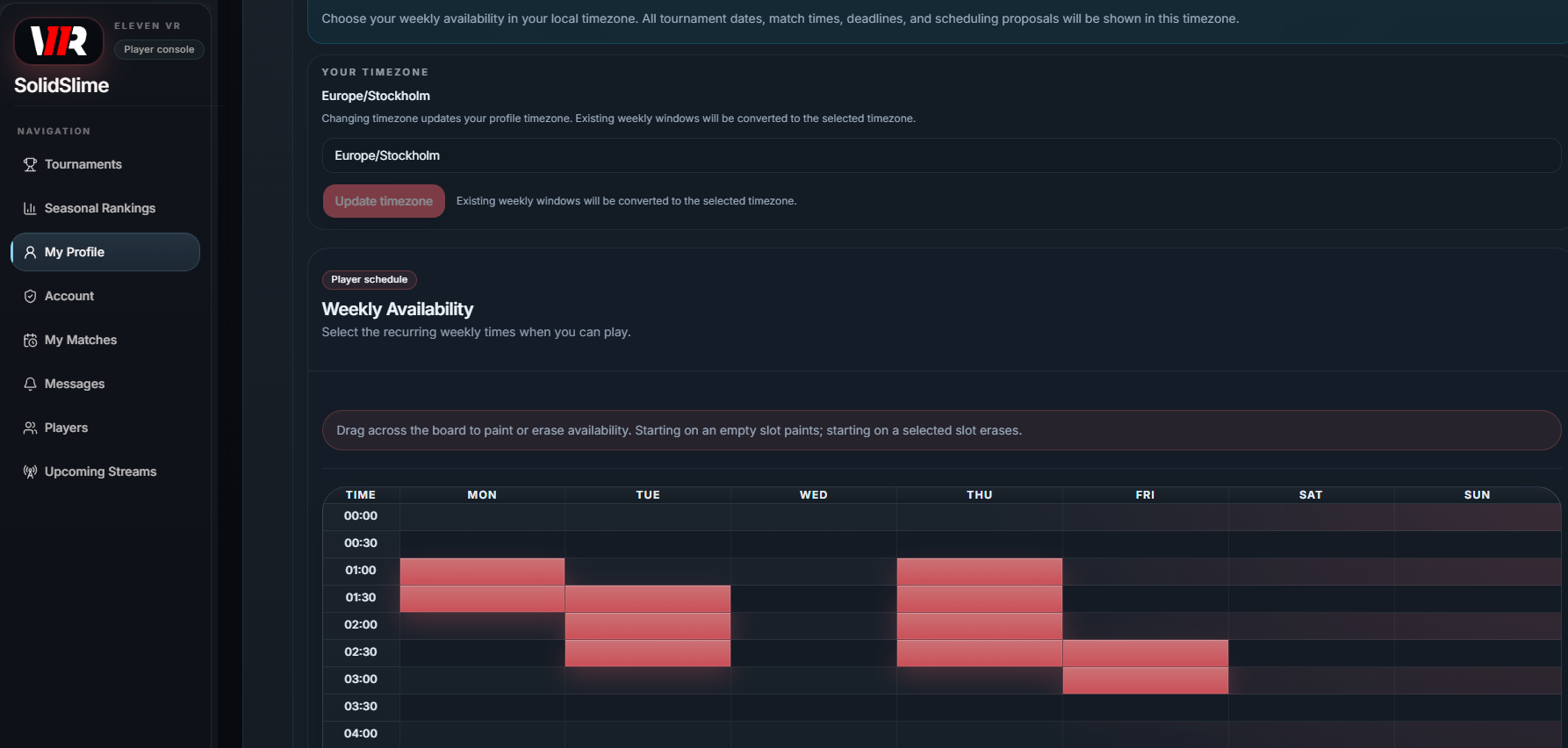
The tournaments used to be organized around Challonge, but since this month, an official website is launched to host ETT tournaments, at https://tournaments.elevenvr.com .
Through this website, you can effortlessly arrange matches with opponents based on self-selected free time slots. After the match, the website will instantly the match results without human intervention. If you really need to coordinate with the opponent, a real-time chat function is available.
I’ve made a step by step video to help you enter the tournament:
As the world awakens and spring begins its quiet return, we are breathing new life into the SolidSlime Adapter collection.
To celebrate this season of renewal, you may now curate your own aesthetic: the color of the adapter cap is yours to choose, at no additional cost. For those who wish to keep their options open, individual caps are also available for order.
Should you find yourself dreaming of a different hue or wishing to color other parts of your gear, simply leave a note with your order. While we are bound by the limits of our filament supply, we will do our very best to accommodate your vision and bring your unique requirement to life.
We hope this small splash of color brings a touch of joy to your journey.
As always, this invitation to personalize extends across our global network. You can find these new hues at any of our partner sites, reaching (almost) every corner of the world.
Ever wonder about what bounce / spin / throw coeffecient values do in ETT?
Bounce is quite straightforward: It’s the outgoing speed of the ball comparing to the incoming speed.
Spin can be loosely understood as the amount of spin you can generate while brushing the ball.
Throw Coeffecient is a programmatic multiplier on the effect of incoming spin on the paddle; that is, with incoming topsin to your paddle (held perpendicular to the table surface), a higher throw (> 1.0) will cause the ball to reflect off your paddle more towards the ceiling, whereas a lower throw (< 1.0) will cause the ball to reflect less (and at 0.0 throw, the paddle would not react to incoming spin at all). Similarly, with incoming backspin to your paddle, a higher throw will cause the ball to reflect off your paddle more towards the table. A diagram of what the throw parameter does can be found on the FAQ channel of the official ETT discord:
Here is a step by step guide of how to match up your in-game paddle with your real paddle:
And a fantastic video on this topic that explains in practice! Made by the wonderful Brazilian coach Wlad Pimentel .
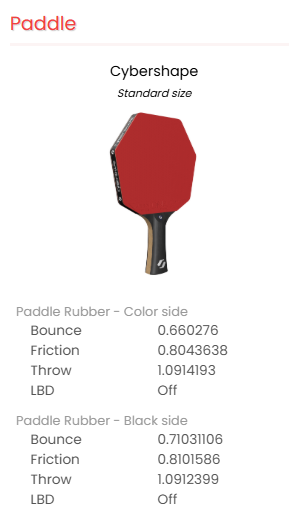
If you would like to see what other players set their rubber values to, now it’s possible to view any ETT player’s racket values on https://11clubhouse.com !
Be aware: other people’s favorite rubbers are only for references. You will very likely need to test and finetune until you find your best rubber values…which can still change overtime 🙂
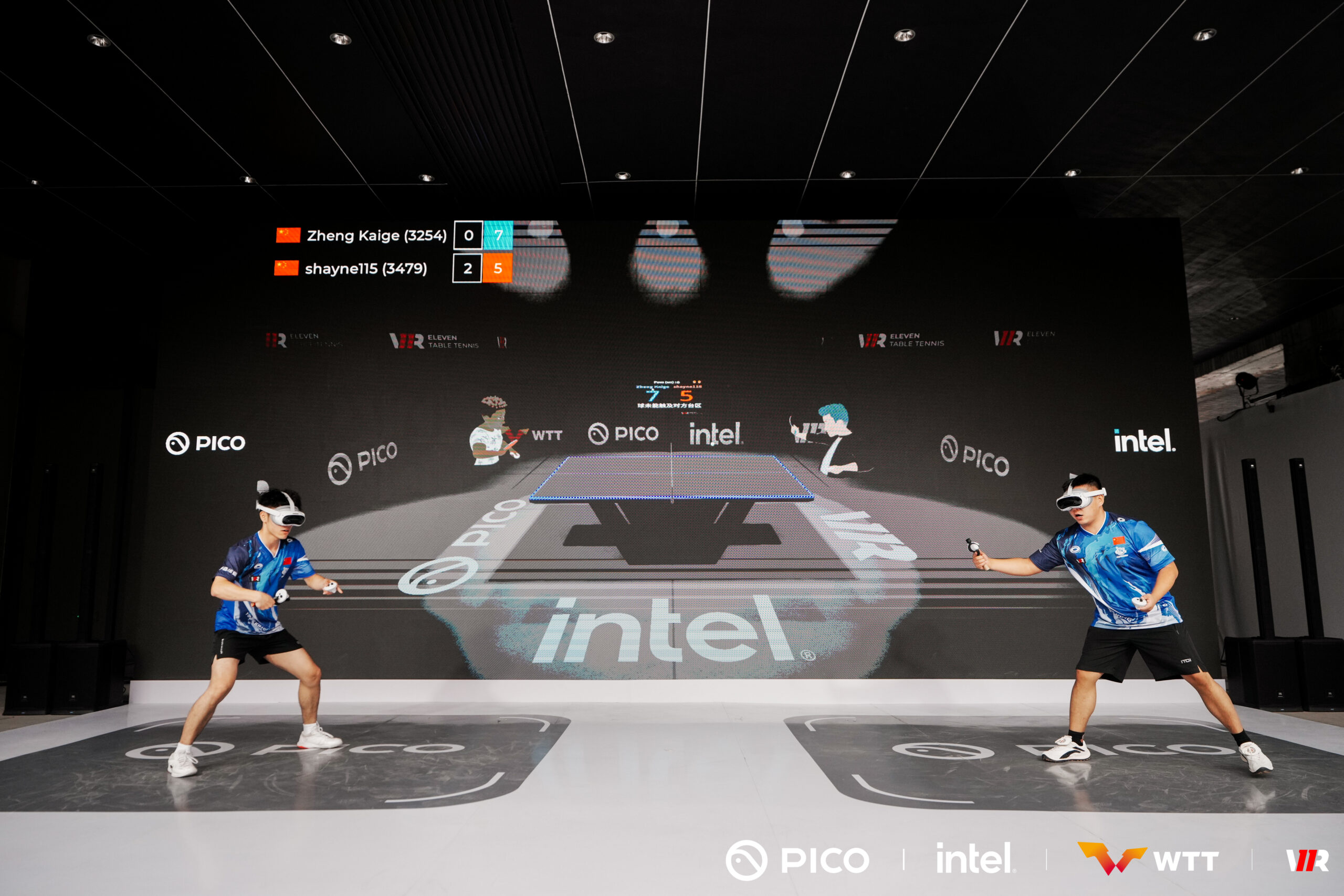
Today I got to watch the very first WTT E-Smash 2025 Tournament, and wow — what an event. Super well organized from start to finish. The venue’s actually the same spot where China Smash is happening, so there were tons of table tennis fans getting into the VR version of the game — a pretty cool crossover.
Since the event was co-hosted by Pico, all the players had to use the Pico 4 Ultra headset. Watching the finals, I was seriously impressed — the tracking on that thing is crazy good. It’s just a really solid headset overall.
Out of the eight players who made it to the final rounds, seven used the SolidSlime Pico 4 Ultra adapter (one is not using any adapters). Not a big surprise — these players all have amazing real-life table tennis skills, and a good adapter makes a huge difference when you’re trying to bring those skills into VR.
In the end, Shayne115, Forimba, and ZKGCurry took the top three spots.
Big congrats to everyone who competed!
I’ll do my best to train myself, so I will have a better chance of getting into the final next time 💪.
Below are a few photos from the event. I’ll spend the next few days to process the videos recorded.
TL;DR: v3.3 improves backhand tracking and strengthens the adapter’s structure in multiple areas.
Tip: We began shipping v3.3 a few weeks ago, so if you recently ordered an adapter that’s still on its way, chances are it’s already the latest version.
Here are the key differences between v3.1 and v3.3:
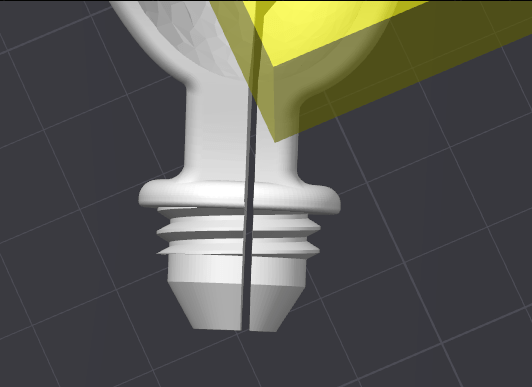
Split the screw in an asymmetrical way. This will make the bending part (the thinner part on the right side) more flexible. It will become less likely to break.
Re-modeled the controller holder. This brings several big improvements: not only that it’s much easier to push the controller in and take it out. but also there is much less pressure between the “bottle cap” and the “screw”.
Increased the LED hole a little bit to match the LED size, to improve tracking even further.
Remodeled the flared and straight handles, so the top part have thicker shells. The middle part of the handle has been strengthened too.
Over the past few weeks, we’ve been testing v3.3 both in-house and with top-level ETT players—who’ve given us overwhelmingly positive feedback. With no further changes needed, we’re excited to officially release version 3.3.
The newest SolidSlime Table Tennis Adapter for Quest 3 is now available for purchase at VRPingPong.net.
I have now replaced the popular 4008.1/4008.2 drills so they work with the new physics! Now the balls will land on the table as expected.
What it is:
This drill pack consists of SolidSlime ‘s 40 serve return drills and AlexTTBCN ‘s basic & advanced drills that cover many techniques and combinations. It is freely downloadable in Eleven Table Tennis.
To get the new drills:
Make sure you don’t have ball machine enabled in the game.
Open settings->advanced->Backup and reset->Ball machine ->enter 4008.1 (righty) or 4008.2 (lefty) and press Download.
Open Training&Practice->Ball machine. Tick the drills that you would like to practice.
This website uses cookies to improve your experience while you navigate through the website. Out of these, the cookies that are categorized as necessary are stored on your browser as they are essential for the working of basic functionalities of the website. We also use third-party cookies that help us analyze and understand how you use this website. These cookies will be stored in your browser only with your consent. You also have the option to opt-out of these cookies. But opting out of some of these cookies may affect your browsing experience.
Necessary cookies are absolutely essential for the website to function properly. These cookies ensure basic functionalities and security features of the website, anonymously.
Cookie
Duration
Description
cookielawinfo-checkbox-analytics
11 months
This cookie is set by GDPR Cookie Consent plugin. The cookie is used to store the user consent for the cookies in the category "Analytics".
cookielawinfo-checkbox-functional
11 months
The cookie is set by GDPR cookie consent to record the user consent for the cookies in the category "Functional".
cookielawinfo-checkbox-necessary
11 months
This cookie is set by GDPR Cookie Consent plugin. The cookies is used to store the user consent for the cookies in the category "Necessary".
cookielawinfo-checkbox-others
11 months
This cookie is set by GDPR Cookie Consent plugin. The cookie is used to store the user consent for the cookies in the category "Other.
cookielawinfo-checkbox-performance
11 months
This cookie is set by GDPR Cookie Consent plugin. The cookie is used to store the user consent for the cookies in the category "Performance".
viewed_cookie_policy
11 months
The cookie is set by the GDPR Cookie Consent plugin and is used to store whether or not user has consented to the use of cookies. It does not store any personal data.
Functional cookies help to perform certain functionalities like sharing the content of the website on social media platforms, collect feedbacks, and other third-party features.
Performance cookies are used to understand and analyze the key performance indexes of the website which helps in delivering a better user experience for the visitors.
Analytical cookies are used to understand how visitors interact with the website. These cookies help provide information on metrics the number of visitors, bounce rate, traffic source, etc.
Advertisement cookies are used to provide visitors with relevant ads and marketing campaigns. These cookies track visitors across websites and collect information to provide customized ads.